Browser-session engine
Chrome LevelDB, cookie SQLite + WAL, macOS Keychain, PBKDF2, and AES decryption—locally, with structured failure codes.
Catch up on Slack without reading it
Your AI client reads the DMs, follows the threads, and finds the answer buried three weeks back. 20 tools. Free, local, and yours.
npx -y @jtalk22/slack-mcp --setup
macOS + Chrome: automatic setup. Windows / Linux: bring your session tokens. Node 22 or 24 recommended.
Claude Code · Claude Desktop · Cursor · Copilot · Windsurf · Gemini CLI · Codex CLI · any stdio MCP client
What blew up overnight?
The agent inventories unread channels and DMs, retrieves the history that matters, finds buried details, and closes approved loops through real Slack tool calls.
Catch me up on #engineering from the last 24 hours. Link the threads behind the decisions, blockers, and next actions.
Paste a prompt into your connected agent, or explore the interactive demo with sample messages. The 47-message example below uses the same sample workspace.
unread messages competing for attention
conversations with work that actually matters
prioritized brief with owners, risks, and next actions
Slack tabs required to understand the morning
How it works.
The local path combines browser-session extraction, a real credential lifecycle, full-fidelity Slack reads, guarded action tools, and automation-ready output.
Chrome LevelDB, cookie SQLite + WAL, macOS Keychain, PBKDF2, and AES decryption—locally, with structured failure codes.
Keychain-only storage, owner-only files, atomic writes, cross-process locks, health monitoring, refresh, and isolated workspace profiles.
DMs, channels, search, complete histories, threads, unread state, users, blocks, attachments, files, reactions, and metadata.
Replies, reactions, and read-state changes with MCP destructive annotations so the client can gate workspace writes.
Incident, executive, support, launch, and custom profiles that turn Slack into contract-shaped JSON rather than prompt-shaped glue.
Where it runs.
Slack's official MCP server is an app your workspace admin approves; use it when your organisation wants a sanctioned integration, and on Enterprise Grid. This project runs locally from the browser session you already have, or hosted, on a schedule.
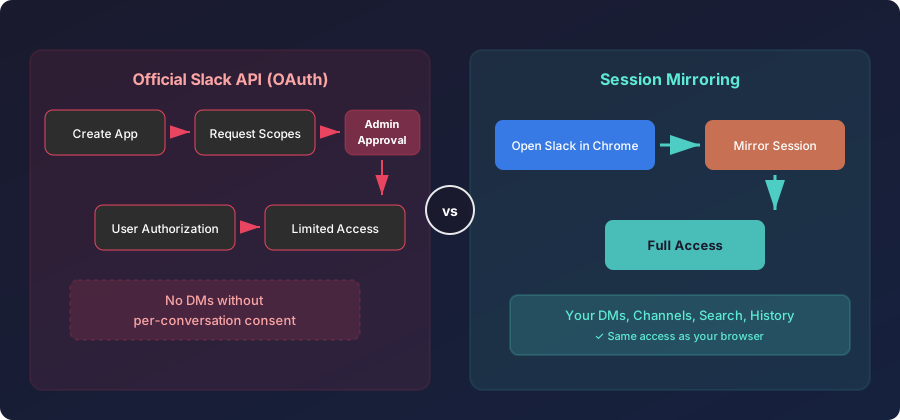
One-command setup, existing browser permissions, the full current tool surface, and the runtime on your machine. Best for interactive, operator-driven work.
Run local setup →Read-only Shadow Reports, scheduled briefs, shared workflow profiles, and signed delivery, running while your laptop is closed.
See hosted →If you can read it in Slack, your agent can work from it.
npx -y @jtalk22/slack-mcp --setup